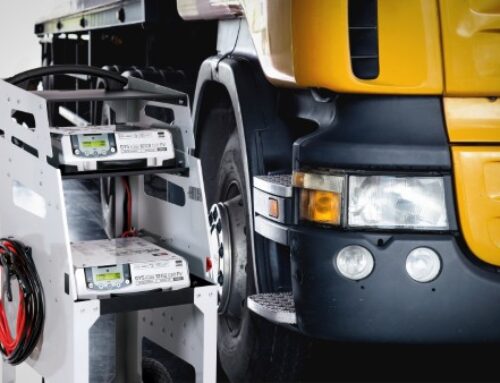

Texa adds AC value with Konfort Touch
 Workshop technology provider Texa offers a range of air conditioning charging stations in the form of its Konfort Touch range – featuring a 10-inch colour touchscreen display, Android operating system and main service dashboard to enable customisation of charging operations and easy starting.
The range includes the Konfort 780 Touch Bi-Gas, which allows users to alternate services on vehicles equipped with refrigerants R134a and R1234yf, as it features two tanks and two separate circuits for recovery, recycling, and recharging.
The service process is automated, and other distinctive features include airtight oil bottles, a scale locking/unlocking device, a refrigerant weight accuracy check system, and an automatic cleaning device for all the hydraulic ducts.
Also available is the Konfort 760 Bus Touch, for R134a or R1234yf. Both high performing, the units are also equipped with airtight oil bottles, fully automatic service management, scale locking/unlocking device and refrigerant weight accuracy check.
Moreover, the 760 Bus Touch version is designed for larger systems and equipped with a larger tank, pump, and compressor.
Texa highlights the Konfort Touch units’ Wi-Fi connectivity as a key factor in their ease of use. It enables a range of activities such as printing reports in A4 format, receiving real-time software and firmware updates, receiving remote technical assistance, and connecting with the myTexa portal and Konfort Mobile App.
The Bluetooth module also allows connecting the stations with several accessories, such as the A/C efficiency kit. The stations are additionally equipped with a practical USB port, which can be used to back up the reports of the services performed and the entire system. It can also be used to install software updates if the workshop does not have a Wi-Fi network.
 Users of Konfort Touch can count on constant aftersales assistance, says Texa, thanks to its online technical assistance offering.
To use this service, users need simply connect the station to the workshop’s Wi-Fi network, access the Applications page from the software interface and select Remote Assistance.
From here, it is possible to ask for the help of a specialised technician who will take control of the Konfort Touch remotely to carry out maintenance activities in support of the operator at the workshop.
For example, the technician can activate the station, check its operating status and any errors that it may have set, calibrate the scales, check the solenoid valves, and much more.